Web Test Hub

Monday, 7 August 2023

Book Review Part 2: The 2 Minute Tester - Chapters 8-14


Part 2 of our book review series for 'The 2 Minute Tester' and this time around I am sharing my feedback and thoughts on chapters 8 through 14. Some of these chapters were a cause of some good discussions (thank you fellow book club members!) 


Chapter 8 - User Acceptance Testing (UAT): Test Techniques

- This chapter briefly defines UAT as ‘real users using the real system to run through real business processes

Mentions: “..create UAT test cases..” And “…act as an enabler. You are enabling the business users to access the system” but then later in the key takeaways section mentions “be very clear in how you categorise any issues you find..

- I’m confused - I have assumed based on the chapter that the end users do all the testing not us. This chapter implies that we just enable the UAT via setting up the system, providing logins etc. But then it specifically mentions we are the ones that found the issue and categorise, in the key takeaway.. Is this because the UAT team are reporting these directly to us? In my experience this hasn’t happened. They may report to us if they need help with certain aspects of their testing, but not for us to collate all their bugs, observations and enhancement requests. However, my experience with UAT is quite limited in this regard (reporting etc)

- The chapter also appears to contradict itself by defining UAT as having real users run through real business processes, but it’s the tester that is defining all of the business processes via test cases - in my experience end users always know their business processes and do not require test cases for those. Perhaps some high level charters will be shared with them, and then agreed - we can then help with the steps/scenarios

- The first page and half of the next is specifically for waterfall environments. Only a few lines mention how things might be different in an Agile environment - but could be applied to waterfall projects too so not to clear on the difference here other than having it included as part of definition of ‘done’ in a sprint.

- I agree with one of the main takeaways being 'act as an enabler/facilitator'

Chapter 9 - Test Team Leadership: Management

A chapter on leadership and what it requires.

Mentions: “Your role is to describe what good looks like, for example, ‘Defect-free release of system A in 8 weeks with 35 specific user flows fully functional and able to cope with 10,000 concurrent users’.

- regarding this, if we never test it at all, technically it’s defect-free (because there'd be no defects raised)..Also 'defect-free' in my opinion is just not a measurement

- all of the above can be achieved by automation. Do we really need testers? Just automation engineers it seems

- that aside, I like that the example used for defining the description of good is specific, and avoids ambiguity (as this can be quite vague in teams at times)

Mentions: “In both agile and waterfall you need to resist the urge to micromanage..” but the example used when suggesting an alternative approach is quite patronising and sounds does very micro-managing-like “you have an awful lot of negative tests..

- this also contradicts another one of the key takeaways listed “ask questions; don’t offer what you think the answer is immediately”. In the example above the author has already offered the answer of looking at commonality between the tests to reduce the number.

- I like that the chapter emphasises coaching and enabling over micro management. 


Chapter 10 - Dealing with Management or ‘Wait, what do you guys do again?’

This chapter does a pretty good job of offering ways testers (not just managers) can demonstrate the value they bring to a team and a project.

- I like that one of the key takeaways specifically mentions ‘..demonstrate, and not with powerpoint..

I also liked that the author reminds us that “this is a problem you need to own and resolve” - but I’m not sure on the 'resolve' part of that. It can happen that testers demonstrate their value, but are still not valued by their team or specific team members (in my experience)

There are some good examples of ways to collaborate like mentioning 3-amigos sessions etc. There was mention of using the ABC macro which is ambiguity checking in requirements but I found this could be used in refinement sessions too and also we could look for not only the presence of words like 'may', 'might', 'could' and 'should' but we should also be aware of the absence of them too.

For example an absence of the word ’should’ could imply that we have either mistakenly assumed something ‘will’ do something or we haven’t explained how something ’should’ work (what we expect to happen)


Chapter 11 - SWOT and How it Can Help Your QA Delivery: Test Techniques

This chapter summarises the SWOT approach which is a 2 by 2 table showing strengths, weaknesses, opportunities and threats.

Generally I like that this chapter emphasises on talking to members of your team to get the full picture. The example SWOT table shown in the chapter was limited to only a QA team, but I think it could apply well to cross-functional teams too with input from each role.


Chapter 12 - Becoming a Test Manager (1): Management

After the first paragraph I feel I somewhat start to know the author as opposed to previous chapters which were your typical tips. I’d like to see more of the authors experiences shared. This was a good touch to the chapter for me. 

One of the key take aways listed is ‘Empathise, don’t tell.’ I enjoyed this short chapter. The author mentioned 3 references for working in management ‘communicate, set and see’. The small criticism I have is this is not really specific to management, and can apply in general for all levels of testers as we are often the bearers of bad news, it’s important we share this information in the correct way. 


Chapter 13 - Becoming a Test Manager (2): Management

This chapter should have been before the previous one in my opinion because unlike the previous, it touches on making the move into management and what you can do to get there.

In general I like this chapter too, there are some practical bits of information I can take with me, some books referenced and I generally agree with all of the key takeaways from the chapter.


Chapter 14 - GDPR: Data

This chapter highlights the importance of the GDPR data legislation and how we can go about navigating this in our roles. 

In my experience, companies usually have specific teams that handle this, and also generate some policies that employees have to abide by. Training is also provided but with that said, I’d have liked this chapter to have focussed more on the importance of data and anonymisation.

Data legislation and policies around this are very important for testers - so I am glad the topic of data has a dedicated chapter in this book. There are some good points raised around using production data in testing and how potential breaches lay in wait.

I did however disagree with one of the key takeaways which is simply “Do a data audit”. This could be something a tester could initiate or facilitate but doing the audit themselves - I’m not sure that is best/good practice as in my experience, as mentioned above it's always been a third party doing the auditing.

Share:

Monday, 31 July 2023

Book Review: The 2 Minute Tester - Chapters 1-7


The 2 Minute Tester by David Bruce is a blend of soft and hard skills, advice and tips spread throughout 33 chapters. The review for this book will be split in a series of posts, as and when the specific chapters are covered in our book club. The questions and comments I have on each chapter are cause for some great discussions and my comments are not always correct. In fact, I was reading back through, and it seems in the beginning of the comment I appear to be unsure of a thing, but then later convince myself that I actually agree. Take my review as you will - and I certainly hope it doesn't discourage you from reading.


Introduction pages:

At the beginning, in the “Who this book is for” section, it mentions:

..where assurance is key..” And “…assurance requires a deep understanding of techniques…

  • I disagree that assurance is solely the tester’s responsibility, despite the common title of “quality assurance engineer”

Chapter 1 - Exploratory Testing

This chapter generally summarises exploratory testing and the benefits of using the approach


mentions:

you don’t have much time..
And “exploratory testing is a useful technique when there isn’t much time available, you need the system tested quickly


  • At first I didn’t think the time issue was relevant to exploratory testing, but upon reflection if I didn’t know a system and someone wanted their product shipped asap, I’d first ask - why am I testing this now? at the point where I have not much time and more importantly, why do I not know the system? (if working on a project)

    Questions aside, if you want to get something tested quickly and you do not know the system/application of how it works - exploratory is the natural approach to take. So agree here.
  • I found it interesting that point 3, mentions “pre-investigation” and speaking with the team, under the chapter of exploratory testing. This is often overlooked.

Mentions:
is it often most effective either at the beginning or end of a specific test phase..” And “…if operating in an agile manner, at the end of each sprint

  • I’m not sure I agree with this. Why would exploratory testing be most effective at the end of a sprint or test phase? Exploratory testing is about learning, ideally we’d want to carry this out as soon as the product is ready to test (and also via discussions before it is built)


Chapter 2 - Effective Team Working in QAT


This chapter is a brief summary of how to effectively work as a QA team.

Mentions:

effective team working” and “..what makes an effective QAT team?.. 

  • Seems to imply the QA team are separate from the rest of the dev/engineering team. Personally I believe when you make QA a separate team, this is quite ineffective. I prefer the Agile approach where you have cross functional teams (QA, dev, product owner etc all in one team together collaborating) 


Mentions:

stop thinking of devs as people whose work you are trying to find fault with and start with the view that you are helping them deliver the best solution possible

- how about both? I am aiming to find problems in the work - and help them deliver the best solution possible. Just be kind and compassionate as you should be - don’t treat people bad, period. 


Chapter 3 - The Tester Mindset: 80/20


This chapter explains that 80% of our efforts should be focussed on edge cases and 20% of our efforts on "happy paths"

Mentions:


As your suite of tests increase (if you are testing in an iterative, agile manner) more and more of your negative tests should be automated

- 1. Why is this restricted to agile? Waterfall projects also have test suites build up over time, from which you can automate the negative tests

- 2. I don’t have experience of working with test suites on agile projects, but we did trial X-ray and the test case approach didn’t work for us


Chapter 4 - Risk-based Testing: Test Techniques


This chapter briefly explains what risk-based testing is, how and when it is used and the benefits of the technique.

- The author tells us that risk-based testing is when “…you need to test the most-important, or riskiest parts of the solution

- Personally I’m not sure where I stand in relation to assuming here that ‘most-important’ and ‘riskiest’ are the same thing. On a pension application for example, the most important thing could be simply seeing what the current valuations of their savings are, a value feeding through to the front end - but most riskiest could be performance. What happens when hundreds of thousands of customers do this at the beginning of the month, after they’ve been paid by their employers and they login to see the state of their pension?

I incline to believe they are the same, because important can be the riskiest, depending on who you are referring to - your customer? Or your in-house architecture team?

- I like the 3 parts mentioned for defining most-important, or riskiest:

- key functionalities
- Likelihood of failure
- Impact of failure

- I also like that we are reminded a lot of the information above can be found through discussions with subject matter experts. I’d have liked to have seen this mentioned as a key takeaway at the end of the chapter

- In the section for “Impact of failure” I liked the example used for purchasing something as a gift on an online store and hiding the price of the gift for the receiver

- One of the key takeaways from this chapter that are mentioned is “focus on key functionality, less so on edge cases.” Usually in projects, a lot of the key functionality is usually automated and monitored. But even if they are not, I believe when looking at the most-important parts of a system, spending a good amount of time thinking and exploring edge cases is required, and in fact often naturally performed by the tester due to the importance/risk of the part being tested


Chapter 5 - Static Testing: Test Techniques


This chapter appears to assume that static testing is performed on requirements documents.

- We are told that great benefit of this technique is that it is done very early in the development cycle, but then in the next paragraph tells us in relation to tools to use for this technique, “In terms of tools it is hard to beat the human eye for static testing.” The author seems to assume Testers cannot get involved even earlier, before any documentation is drafted throughout this chapter.

- I have found working with Product Owners that present their ideas/intentions for building something before drafting documents up as gospel, to be of great benefit.

- Again the bulk of this chapter is advising us how to perform static testing on documents using search functionalities however I liked that the author suggests we look out for terms such as should, may, could, possibly - the author reduces this to searching for these in documents, but we should always take note when such terms are used in discussions around the product in general too.

- I’m left pondering on whether I need to go back to my “ISTQB Foundations” material, to verify whether static testing, is only to be done on documentation? (As the chapter suggests)


Chapter 6 - Building Your Own Avengers Team: Recruitment


This chapter is a brief summary of how to build a diverse team.

- First immediate thought was, is the author testing us Marvel fans by telling us Thanos is part of Avengers “team”?! Using an example to demonstrate the strength of diversity, the author writes: “..it’s hard to think of a more diverse team than Black Widow, Thanos and Thor, for example” 


- On how to build a great diverse team, the author mentions: “You hire different from yourself…if they look like you, then you don’t have a diverse team.” That could be true, but in Agile environments there is typically no separate QA team. So if you look around, and everyone doesn’t look like you, but they have the same role and perform the same job as you - is that diversity? In my opinion, the cross-functional team approach is a great example of diversity - you have many diverse opinions on one subject all viewing it from the lens of their role in the team. This can strengthen our testing, and help us consider more variables when testing too.

- It seems the author isn’t sure if by diverse he means the way people look, or diverse in relation to skillsets and approaches. The author mentions how he had an interviewed someone wearing a flowery Hawaiian shirt, shorts and sandals - but ended up being hired, based on his passion and background working in startups.. no mention of skillset or presenting a diverse opinion or approach here. 

- In my humble opinion, a diverse team is more about the shared ideas, approaches and opinions and consideration for others when sharing those. For example, we could hire an automation engineer that believes all the testers are beneath them because they are doing the work of monkeys manually tapping and clicking away. So here, we have some diversity in opinions/skills and approach, but does that now mean we have a great team? 


Chapter 7 - Specification by Example, or True Living Documentation: Test Techniques


This chapter refers to a test technique called 'specification by example' but doesn't do a great job of explaining what it is. The lack clarity here though is my problem and I'll be reading up on this matter.

- Admittedly I don’t know much about Gojko Adjic or his concept of SBE - and that’s a good thing because now I will go and read up and learn more (one of the key takeaways listed at the end of the chapter too)

- UPDATE: after reading up about it, I initially thought this was the gherkin/BDD approach to things (which is how I interpreted it from the book) - but there does seem to be a subtle difference. Still slightly confused. With that said though I’m all for removing ambiguities and having some clear (as possible) requirements.

- The chapter is a little confusing to me, but that’s my problem


- One of the other key takeaways at the end of the chapter mentions: “Remember it isn’t just QA, it covers development, business analysis and project management as well” - but in my experience this is the same for your typical set of requirements also. We all interpret the document in our own way, and frequently revisit (sometimes with customers) to ensure we are on the right track. Not sure why this is mentioned as if it is specific to the ‘specification by example’ approach

To be continued...

Share:

Wednesday, 19 July 2023

My Testing Journey Presentation - Hosted by QA Beginners Club


The amazing team over at QA Beginners Club were kind enough to let me share my testing journey. 

I spoke about what I was doing before testing, making the transition into it and where I am today.

I also touched on the highs, lows and the many lessons learned along the way. 

You can check it out via the Youtube link below! They also have more great content too, so be sure to subscribe.

Thank you Chris and everyone else at QA Beginners Club. 

https://www.youtube.com/watch?v=iKRu6pB_TC8

Share:

Monday, 17 July 2023

Testing - A Jackie Chan Approach


“What do you mean you do not accept my bug?!” *Flying kick*

No - not that!

In this post, I will highlight some of the important, sometimes forgotten aspects of testing via some observations I made from watching possibly every Jackie Chan movie ever made over the years (kung fu movie fan here) - hence the ‘Jackie Chan Approach.’

Jackie Chan is an absolute master at martial arts performance and arguably the greatest stuntman to appear on film. Known for his unorthodox approach to martial arts action, I believe we can take some important reminders from Sensei Jackie.

It is my belief, that Jackie Chan would be the greatest tester ever, had he ever tested software for a living. I know, I know, but hear me out…

Firstly, **Disclaimer - this post is not to condone any acts of violence**

And so we begin. Martial arts movies typically follow the standard plot formula. Something like:

if bad.thing happens to main.character
    and main.character seeks revenge

        using.KungFuPowers
then movie.genre = 'martial arts'
end


Putting my poor attempt at coding aside, the Jackie Chan movies follow the same structure but there are two things that make the Jackie Chan movies distinctly relatable to our job as Testers.


Establishing the Mission

In our role, like the movie genre above, we want to start out by establishing our mission.
Has this product upset us in some way, or someone of value to us? A client, or end user perhaps? ‘Upset’ here, meaning we have experienced a problem of some kind.

In this case, we would probably be addressing a particular bug or pain point of the product found by somebody else. Not a great place to be in, as ideally we would have found this problem during testing, before our person of value did, however it is a very real possibility and a most certain reality that will occur at some point in our careers.

When addressing problems found by others, our mission will consider these factors and how we embark on that mission will be a great learning experience. Our mission in this case could be:

Verify the conditions of the problem and try to ensure that under the same circumstances, this bug no longer occurs.

Taking a more general approach, as Testers our mission should be:

Find potential and actual problems

This general approach can encompass risk-storming at the beginning of a project, all through the development cycle up to and after delivery of the project. All of our testing activities can happen in the context of this mission. For example, When refining or building requirements for it, how can we find potential problems?, what are the risks?, in what ways is it testable? Are we sure we have understood our clients? How would things look and playout in the worst case scenario, if everything goes wrong?

In trying to get some answers for those questions, we are achieving our mission.


Unfamiliar Places


In ‘Rush Hour’ and ‘Rumble in the Bronx’, Jacke Chan plays a detective arriving in the USA from his home country China. Whilst in pursuit of his mission, he is forced to get familiar with the unfamiliar very quickly, adapting to new places, new relationships and new situations.

This is very similar in testing. We are regularly faced with the unfamiliar and are forced to work in these new contexts, otherwise our job, and the quality of which it is performed suffers greatly. We are met with new features and enhancements, and to help us make sense of these, we have to build relationships with new people and teams, often speaking with people we haven’t met before, again - with the aim of achieving our mission.


Naturally, in unfamiliar situations there is a lot of exploring and there are many questions asked. The answers we get for those questions help us ask more specific questions until we start to get a more clear picture and we can then begin to build a story around our mission. Much like Jackie did in those movies.


Challenges Along the Way


Here is where I find one of the two things that make Jackie Chan unique in his movies, which I believe can relate to testing.

Typically in a Jackie Chan flick, the obstacles that stand in the way of him and his mission take the form of ‘bad guys’. You know the type, angry facial expressions, speaking in grunts and not the most friendly of people. Combat ensues and this is where Jackie becomes the ‘greatest tester that never tested software’ in my books.

The obstacle has presented itself, in the form of a group of bad guys but lo’ and behold, there’s a ladder in the room. We know what ladders are for, but being the creative person Jackie is, he decides to use this ladder as a weapon! And ladders aren’t the only victim of his innovations. For example, one viewer online noted, that in just one movie there was use of:

- A belt

- A pool cleaning net

- A bicycle

- Some chairs

- A pot of spaghetti (flung by his feet onto head of assailant holding him from behind)

- Some plates (flung Frisbee style)

Now I haven’t ever used any of the above tools to test a product but I thought to myself, here is someone that will use every possible thing available in order to address any challenges - utilising tools that were not intended for use in a martial arts encounter.


I relate this to testing because I believe we should have the same approach in our roles. I want to find and use any tool possible that will help me succeed in my mission. We should be testing beyond requirements and acceptance criterias. Communication is a great tool. I once met with a team to get some valuable data regarding a project I was working on. The team never had a tester speak to them prior to that. Like Jackie, I want to take a look around and see whatever is there that can be utilised. This can span from meeting with other colleagues and teams to get valuable information, reading through documentation to using tools that perform specific functions on our product under test (and much more depending on your context, and more importantly whether you care to look!)


No Replacements


It is well known that Jackie Chan performs his own stunts in his movies and certainly pays the price for doing so. Over the years he has broken many bones and his body has taken a real beating. This brings me on to the second thing I believe we can apply to testing.

Jackie Chan, like every other actor has the option of brining a stunt man in to perform the stunt on his behalf - but that’s not Jackie. You watch a Jackie Chan movie, in anticipation of what great stunts will perform, and then for the 20 minutes of bloopers that playout at the end as the credits roll.

As the tech world rapidly evolves, there are now many tools on the market that we can use as testers - but these are exactly that, ‘tools.’ The tools help us as we conduct our testing. We use tools that can automate things, generate data for us, extract, upload, report and much more but we should never want to replace the importance of a skilled tester actually testing. Jackie Chan doesn’t want a stunt double, why should we want someone to ‘act’ as a tester on our part?.. If Jackie Chan needed to fly over a castle wall, then perhaps he might need some CGI tool to help with that. Likewise if we needed a hundred thousand-odd records of enduser data created in our database, we too might look for a tool to help us do that - but that tool isn’t the one testing - just like that wouldn’t be Jackie flying over that castle wall!


Mission Accomplished


And so, those are my observations. What I call the ‘Jackie Chan Approach’ - establish your mission, utilise all things possible that could (even unexpectedly) aid you in achieving your mission and replace your efforts with tools when reasonable, never seek to replace testing itself.

Roll credits! 

I hope you enjoyed this post, and if not at least benefitted somewhat. Please do check out my other posts on the topic of Testing. Regards, James
Share:

Wednesday, 12 January 2022

Retro Notes: Reflections on 2021


In this post I will be reflecting on the previous year and in typical 'retro' fashion I will explore what went well, what didn't go so well and will also address some actions I have decided to take going into the new year.


What went well? 

Towards the end of 2021 I was promoted to a Senior position and immediately following my promotion I noticed that there are many skills I need to work on in order to do the best job I can in such a position. My time management skills for example had a big shake up as the work load increased. So any event/situation that sparks some reflection I do view as important. 

Secondly, 2021 was a year in which I had conducted many interviews with various candidates and got to interact with many ideas. I have changed some of my stances of various activities in the workplace including some prominent testing practices. For example, I used to favour certain opinions such as 'no need for test cases' as a best practice. But I now think it depends on the context. If you are in a company which operates in an industry with many legal aspects and regulations, you might be required to sign those off before even testing - so in examples like this, having test cases is probably a better idea. 

Another opinion I held which I challenged, was Testers decide when things are ready to ship. I used to think that though we do get involved from the very beginning, we as Testers are the ones who test the feature against the requirements and then decide whether it should be shipped/merged. However, upon reflection and a few discussions with other testers and colleagues, this should be something done by the person who owns the project, either Project Manager or Product Owner. My view became more apparent with tickets that work as they should when measuring against the acceptance criteria but certain pathways that were not covered, were not working. so in such cases we have tickets where the acceptance criteria is met and working fine, core flows are working fine but funky edge cases after some exploration are causing errors. In my opinion these tickets were not good to go, but our Product Owner disagreed, accepted the risk and asked us to create additional tickets to fix those other errors. At first it was quite a shock, but I now agree as Testers we do not hold such authority - which is actually a good thing in my opinion. 

Lastly, I also realised the true importance of context both in testing and with anything in general, before populating opinions or drafting actions. To summarise, 2021 was a year of true reflection in regards to my career, what I am doing and where I want to go. Though these are questions I often ask myself I feel like last year things began to get a lot more clearer for me.


What didn't go well?

As you can probably tell by the nature of the content in the cards above, all of those cards could be down to one factor which is time management. I've didn't mind working from home when the pandemic first happened. It's definitely the more safer thing to do in my opinion but after having my second child it can get quite difficult just juggling everything in general. I'm still adapting. I noticed my passions and activities shifted and my life revolves around my kids now. Parents will probably relate to this more but it seems like my life has taken a big shift away from what I once felt were REALLY important. Now they are just about important. I think due to this shift I haven't put as much effort into self-learning, and when I have done I just get side tracked with more life stuff. I set myself quarterly objectives all last year but didn't achieve a single one and I didn't want to beat myself up about it either. I do however think that I really need to develop my task/time management as well as develop habits as opposed to doing things in the spur of the moment when some inspiration comes. All work in progress. 


Actions

So far the only action I have come up with, which is realistic and achievable is to draft my blog posts before writing them up in the hope that this blog will at some point benefit as I really want to give back. I have taken on an 'apprentice' outside of work, who wants a change of career and I think rehashing a lot of the stuff they have to learn will serve as motivation for some new posts. 

So I go into 2022 not on a high, but feeling pretty good about the year to come and I'm glad I was able to reflect on where I can make improvements moving forward. 

I'd like to just use the rest of this post to thank the amazing testing community. Though I may not speak with you all regularly I get immense inspiration when I go through my LinkedIn and Twitter feeds. 

Thank you all, and I wish you all the success in 2022 and the coming years! 

James

Share:

Thursday, 21 January 2021

The Curious Case of the Front End Button


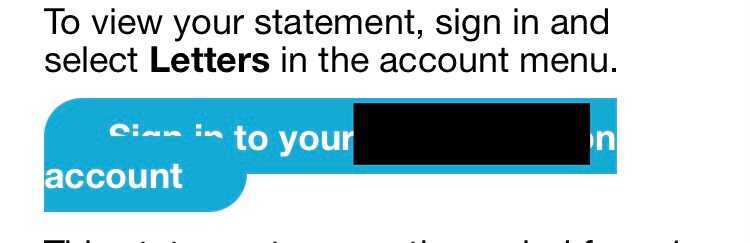
How can we test buttons on a UI? In what ways can we approach our testing? In this post, I’d like to share some things for the curious mind to consider when testing buttons on a front-end/user interface. 


We were recently testing a feature which is going to be rolled out to every user on our platform via a notification. In doing so, our team found an issue with one of the buttons shown to the end user (shown below:)


Luckily the error was fixed before deployment, but finding it inspired this post. As we know, buttons can behave in countless ways on a page, so apologies in advance for the fact that this blog will only scrape the surface of what is a huge subject. Nonetheless, I thought it would be a good idea to share some tips and things to bear in mind if you’re testing buttons on the front end of an application – and I hope you’ll find them useful.

1. How does it look? The first thing the user does with a button is look at it – so let's consider the following:

 - How much text is on the button? If there's quite a lengthy sentence or call to action, could that cause some issues in relation to page responsiveness, as shown above? Additionally, is the font used compatible on other browsers, including older ones?

- Is the colour of the button consistent with the other aspects of the application? If it is, that might not necessarily be a good thing. Does the button call the user to an important action – for example, if it is missed could their account be affected? If so, then maybe the colour should be something contrasting that grabs the reader’s attention and suggests 'click me NOW' in tone (in red or orange, say) as opposed to a more casual 'hey there, why not click?' (if consistent with the usual colours of the application). Alternatively, if the application already uses red or orange colours in its branding, you’ll probably need to use an alternative colour to make the text stand out – something to think about. 

- Does it animate? When you hover over it, does your mouse cursor icon change? Does the button animate when you click on it? If so, you’ll need to start considering how this button will behave on mobile devices, where there is no mouse icon. You’ll also need to think about what will happen with other or older browsers, because the animations may only work on modern browsers. 


2. What does it do? We can now start thinking about how the button behaves. For example, is it a button that submits data? Can it be held down to increase the value in increments (like a counter button)? If so, how would this work on other devices? Does it take us to the correct place when it is clicked on? Is it dependent on mandatory fields? If any of those are the case, we should check that the button works and submits information provided when those fields both are and are not filled with data. 

- Where is it all happening? 

OFF the page: When we interact with the button, we can open our browser dev tools to monitor if there is any activity in the 'network' tab. If so, we can now open to a whole new world of opportunities (API testing, for example). Can we manipulate the HTTP traffic? (An excellent post/video on how to do this, by The Evil Tester, can be found HERE). Perhaps block the request to see how our application behaves in the absence of icons and/or buttons. When we view the requests allowed, should we be able to perform each one? (For example, if it accepts a ‘delete’ request, you may want to question why.) 

ON the page: Alternatively, if we click the button and there is no network traffic, we can then start thinking about possibilities in relation to CSS and Javascript, since the behaviour is happening on the page only. Do new fields open up? If so, do we have an option to go back and close those fields? What happens if we keep going back and reopening those fields? Do they just keep reopening down the page in a never-ending chain? Should they only open up once? You should also check this behaviour on various browsers and devices. 

There are so many different things that can happen on the page when interacting with buttons but, generally speaking, the main things we will probably have to consider in this instance will be compatibility (with other browsers and operating systems) and the performance of the site. Bear in mind that if we have a lot of stuff happening on the page once the button is clicked, we probably have large files stored, and they can slow performance, from as soon as when the site loads as it is first visited. 

ON AND OFF the page: Here’s something else to consider. If we are shown a message of some sort on the front end after clicking the button, does that message correctly coincide with what is happening in the back end? For example, you may get the message 'user successfully created' – but then find, when you check the back end, that there is no user, and vice-versa (reconciling front end and back end behaviours). It’s always worth double-checking.

3. Can and should we automate this? Does the introduction of the button create more work flows? Is the same button used in several places with the same function? If so, perhaps we could save ourselves some time by automating the clicking or hovering of this button, by verifying that it looks and behaves as we expect, or by automating the filling of data it requires. 

Allow me to briefly mention a project I once tested. It was a tool for doctors and healthcare professionals to use to register patients with a specific condition. It wasn’t your normal user creation form, and instead had many tabs containing mandatory fields. I couldn’t get to the next tab on the user creation form until those mandatory fields were filled in on each specific tab (confused yet?!). We had one button at the end of each form, which was used across five different tabs, and, when clicked, opened up a text box requiring more details before you could move to the next tab. Obviously this was very time-consuming – it would take approximately five or six minutes just to create one user. Automating this process seemed to be a natural thing to consider at the time. Whenever I needed to create a new user on the system, it was made a lot more simple and easy via the automated tests we created. OK, this example isn't button-specific, but it does show that there are things we can automate on the button itself, such as left clicks, right clicks and mouse hovers. 

It’s something to consider when testing front end buttons. Bear in mind, though, that just because you can automate it, doesn't necessarily mean you should.

4. Who can use this? What’s the demographic of your users? Do you know? (You should!) Is this button going to be equally usable for those users? Does it use clear text at a good size? Is the colour easy on the eye for those who have difficulty seeing? Can we use an alternative way of doing what the button is doing if the button doesn't work on older browsers or other devices? These are all important things to bear in mind, and it is all too easy to overlook them.

As I have mentioned above, the possibilities are endless when it comes to testing buttons on the front end. It is likely that you wouldn’t ever just test a button in isolation. They are usually brought in along with another page or field, so when testing you should also bear in mind how these components are going to work together.

That's all for now and I hope you’ll find this post beneficial. Do please do let me know what I've missed and what you’d add to the list of things to consider when testing buttons on the front end in general. 

Looking forward to hearing from you! 

@webtesthub
Share:

Tuesday, 27 October 2020

Testing: More Creative Than You May Think


When we think about the term 'creativity', you may think of crayons, pens, paints, music studios and notepads among other things. Testing may not be what you would think of as being creative however, in this post I attempt to make the case that Testing can be one of the most creative roles one could have and I also respond to criticisms in relation to the 'robotic' nature of the role. 

Testing by its very nature demands creativity. Any passionate Tester will have thought about the different ways they can approach the application they are testing. They would have traversed off into the unknown crevices of the code, just wondering what could possibly be waiting for them. A mind filled with 'what-ifs and 'ooo what was that?' type of questions. Wearing different hats, looking at things from the end users perspective, considering the business objectives and just exploring the thing tested, learning and taking notes. Trying to figure out who they need to speak to in order get specific information. This is all part of Testing and requires a lot of creativity.

Often times however, Testers are not empowered. We are only ever reminded of our responsibility when bugs are found in production and things go wrong. The famous "well, who tested it?" line echoes in the minds of those that have been at the end of pointing fingers. Alternatively, we may never get the blame for anything or be even noticed at all, but have been reduced to running test cases written by somebody else, that read like they have been intended for a robot. Managers often want to see nice reports with big shiny green ticks next to each test - shiny ticks of course here mean, the application has ZERO BUGS and is in perfect working order! (I hope you could sense the sarcasm there). Testers are not robots. In environments like these, Testers cannot thrive, and I'd argue that they do not belong in them either. 

So, what is the reason for this post and why am I writing about creativity? As Testers we are neither business analysts nor developers. We are not dealing with the end customer directly, and we are also not fixing any bugs. We're kind of in the middle somewhere. Although I'd say that actually we're more 'around the outside' of all these processes as opposed to in the middle somewhere. If you're not a Tester, I know what you're thinking: .."Testers.. Creative?! Ha! How hard could it be?!" - we don't have a great rep. Or a rep at all sometimes. We're just somehow there in the shadows clicking buttons making sure things work - right? ... No! 

Back to my reason for this post; well, I stumbled across a comment online in response to somebody asking how successful they could be if they did freelance work as a QA/Tester, because they loved travelling but of course needed to make some money to get by.

The replies in the thread, in general were quite negative and this particular one, need I say, made me quite sad... 😞  (<-- sad James)


Here it is below:


"QA Sucks. Convert to a creative job asap while you are young..."

Uff..

Powerful stuff. 

I was sad because though I strongly disagree with this, I am going to assume that this person is speaking from experience and I felt bad for them. I have to admit, I have been on projects that have made me question my career choices however, upon reflection that's never really been because I am a Tester. It's usually down to flaws in processes or gaps in planning on the project. 

My response to the comment above is firstly, I have to point out that they have mentioned 'e-commerce' as a creative alternative. Hmm, I don't think we need to provide any arguments against that suggestion, but to address the programming/coding-related options listed as alternatives; I'd say that the majority of the time developers are faced with the problem of the client dictating how the thing you are building needs to behave, look and function. A Product Owner or Project Manager may not give you the option of HOW to come up with a solution, though they may mention 'yeah sure, build it however you wish but just make sure it does this thing exactly as I have described'... basically, 'you can pick any colour as long as it's red'..

Even the developers that freelance are still at the mercy of the client's wants and needs. Many developers do build their own solutions to problems via new applications or starting their own companies and that is great. Creativity thrives here I'm sure. But a lot of companies treat developers as 'resources'. The companies want something and the developers have the skills to build it so do as they say. (By the way, if you are in a company that present you with their requirements but give you complete freedom in how to build it, then stay!)

To summarise my response, programming/coding is very creative but within a context. Testing is the same, however there is less restriction on how we can perform or role because there isn't really a Testing deliverable as a product. This allows us some more room for creativity in my opinion. No client can EVER really tell you how to test, no Manager or business owner. They can contribute and advise but we have to maintain ownership of our Testing and the way we go about doing it. More specifically with clients, all they can really do is tell you want they want and how they want that thing to work. Testers try to ensure those things happen but at no point are told how to do what they do. We do however report on what we do, and should do so in a detailed yet clear way, whether that be via a detailed report on your findings or communicating them effectively to your colleagues/stake holders. Prior to this stage, our creativity is stretched as far as we allow it to be.

Using a search field as an example, the process of building it (or other features) at a high level, is usually:

Client wants a search field (or X feature) -> client tells Business -> Business tells Managers -> Managers tell Developers -> Developers build it -> build gets tested -> released to client

Now, throughout this entire phase we as Testers are involved, learning throughout the entire process. By the time it has been built, we have learnt as much as we possibly can about the context and all the complexities that by the time we actually physically test it we are able to explore the many possibilities. We aren't just going to check that the search field is present, we would explore the application addressing some questions like:

- Location of the search field. The client really needs this thing so is it easily accessible? (we can check this on numerous devices, what about devices that auto zoom into text fields? etc)

- Does it auto-populate results to help with long/complex terms? (can help us determine if it's javascript returning the results or at server level - we can then explore various changes/tests utilising the browser console)

- What results are returned? - Exploring data validation

- What is the source for the information that is returned? Can I access this source by some data injections? can I access server through various methods/attempts

- Should all this information be visible to me? Is there any legislation in the business domain that dictates this? Can I identify values in data which are anonymised? 

These are just a few questions, coupled with what we learn during our testing that guide our testing journey on the application. This is part of testing and this demands creativity.

The client never asks for what we test in detail, but we do it because our role as a Tester requires us to get creative. It's like detective work. Again, we wouldn't immediately think of detective work when thinking about creativity. 

It is not rare to find Testers pushing their limits with their creativity. Their ideas often push them to go off and learn new programming languages, tools and even build new relationships. Beautiful things happen when people are allowed to be creative, and Testing is no different.

So, no, QA doesn't suck and IS VERY creative, just like many other tech roles, but only IF you are providing your services to people that value your human abilities, as opposed to wanting robots doing their 'testing' *Cough* automation overkill *cough*


If you agree or disagree with anything I have mentioned in this post, please feel free to reach out to me on Twitter @webtesthub - I'd be happy to discuss. My views are only based upon my experience and are always subject to change! 


Share:

Blog Archive

Categories

Followers

Contact Form

Name

Email *

Message *

Subscribe to my Newsletter